原文标题:ToolSimulator: scalable tool testing for AI agents
原文链接:https://aws.amazon.com/blogs/machine-learning/toolsimulator-scalable-tool-testing-for-ai-agents/
您可以使用 ToolSimulator——Strands Evals 中基于 LLM 的工具模拟框架,对依赖外部工具的 AI Agent 进行全面、安全的大规模测试。无需承担实时 API 调用所带来的暴露个人身份信息(PII)、触发意外操作等风险,也无需使用在多轮工作流中容易失效的静态 mock,您可以借助 ToolSimulator 的大型语言模型(LLM)驱动的模拟来验证您的 Agent。ToolSimulator 现已作为 Strands Evals 软件开发工具包(SDK) 的一部分正式发布,帮助您尽早发现集成缺陷、全面测试边缘用例,并自信地交付生产就绪的 Agent。
本文将介绍以下内容:
- 设置 ToolSimulator 并注册工具以供模拟
- 为多轮 Agent 工作流配置有状态的工具模拟
- 使用 Pydantic 模型强制执行响应 Schema
- 将 ToolSimulator 集成到完整的 Strands Evals 评估流水线中
- 应用基于模拟的 Agent 评估最佳实践
前提条件
在开始之前,请确保您已具备以下条件:
- 环境中已安装 Python 3.10 或更高版本
- 已安装 Strands Evals SDK:
pip install strands-evals - 熟悉 Python 基础知识,包括装饰器和类型提示
- 了解 AI Agent 和工具调用的概念(API 调用、函数 Schema)
- Pydantic 知识对于高级 Schema 示例有帮助,但入门时不是必需的
- 在本地运行 ToolSimulator 无需 AWS 账户
为何工具测试会给您的开发工作流带来挑战
现代 AI Agent 不仅仅进行推理。它们会调用 API、查询数据库、调用 Model Context Protocol(MCP)服务,以及与外部系统交互来完成任务。您的 Agent 的行为不仅取决于其推理能力,还取决于这些工具返回的内容。当您针对实时 API 测试这些 Agent 时,会遇到三个让您慢下来并危及系统安全的挑战。
实时 API 带来的三大挑战:
- 外部依赖会拖慢您的速度。 实时 API 有速率限制、会出现宕机,且需要网络连接。当您运行数百个测试用例时,这些限制使得全面测试变得不切实际。
- 测试隔离变得危险。 真实的工具调用会触发真实的副作用。您可能在测试期间发出真实的电子邮件、修改生产数据库或预订真实的机票。您的 Agent 测试不应与其正在测试的系统进行交互。
- 隐私和安全形成障碍。 许多工具会处理敏感数据,包括用户记录、财务信息和 PII。在实时系统上运行测试会不必要地暴露这些数据,并带来合规风险。
为何静态 Mock 不够用
您可能会考虑将静态 mock 作为替代方案。静态 mock 适用于简单、可预测的场景,但随着 API 的演变,它们需要不断维护。更重要的是,它们在真实 Agent 所执行的多轮、有状态的工作流中会失效。
以机票预订 Agent 为例:它通过一次工具调用搜索航班,然后通过另一次调用查询预订状态。第二个响应应取决于第一次调用的结果。硬编码的响应无法反映在调用之间发生状态变化的数据库。静态 mock 无法捕捉到这一点。
ToolSimulator 的差异化优势
ToolSimulator 通过三项协同工作的核心能力解决了这些挑战,让您在不牺牲真实性的前提下实现安全、可扩展的 Agent 测试。
- 自适应响应生成。 工具输出会反映您的 Agent 实际请求的内容,而非固定模板。当您的 Agent 调用搜索从西雅图到纽约的航班时,ToolSimulator 会返回具有真实价格和时间的可信选项,而不是通用占位符。
- 有状态工作流支持。 许多现实世界的工具在调用之间会维护状态。写操作应影响后续的读操作。ToolSimulator 在工具调用之间维护一致的共享状态,使您能够安全地测试数据库交互、预订工作流和多步骤流程,而无需接触生产系统。
- Schema 强制执行。 开发者通常会添加一个后处理层,将原始工具输出解析为结构化格式。当工具返回格式错误的响应时,该层就会崩溃。ToolSimulator 会根据您定义的 Pydantic Schema 验证响应,在格式错误的响应到达 Agent 之前将其捕获。
ToolSimulator 的工作原理
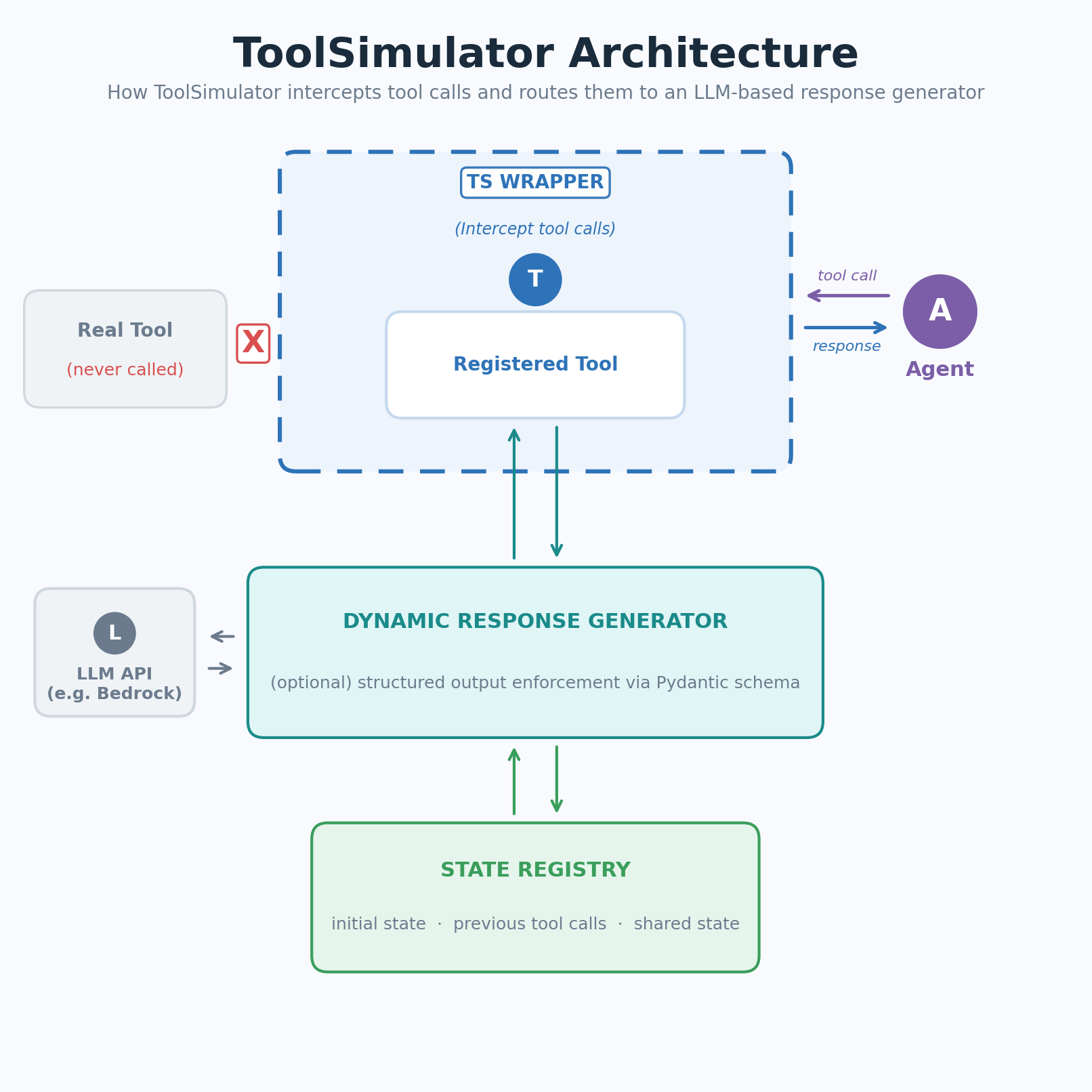 图 1:ToolSimulator(TS)拦截工具调用并将其路由到基于 LLM 的响应生成器
ToolSimulator 拦截对已注册工具的调用,并将其路由到基于 LLM 的响应生成器。生成器使用工具 Schema、Agent 的输入以及当前模拟状态来生成真实、符合上下文的响应。无需手工编写固件。
您的工作流遵循三个步骤:装饰并注册您的工具,可选地通过上下文引导模拟,然后让 ToolSimulator 在您的 Agent 运行时模拟工具响应。
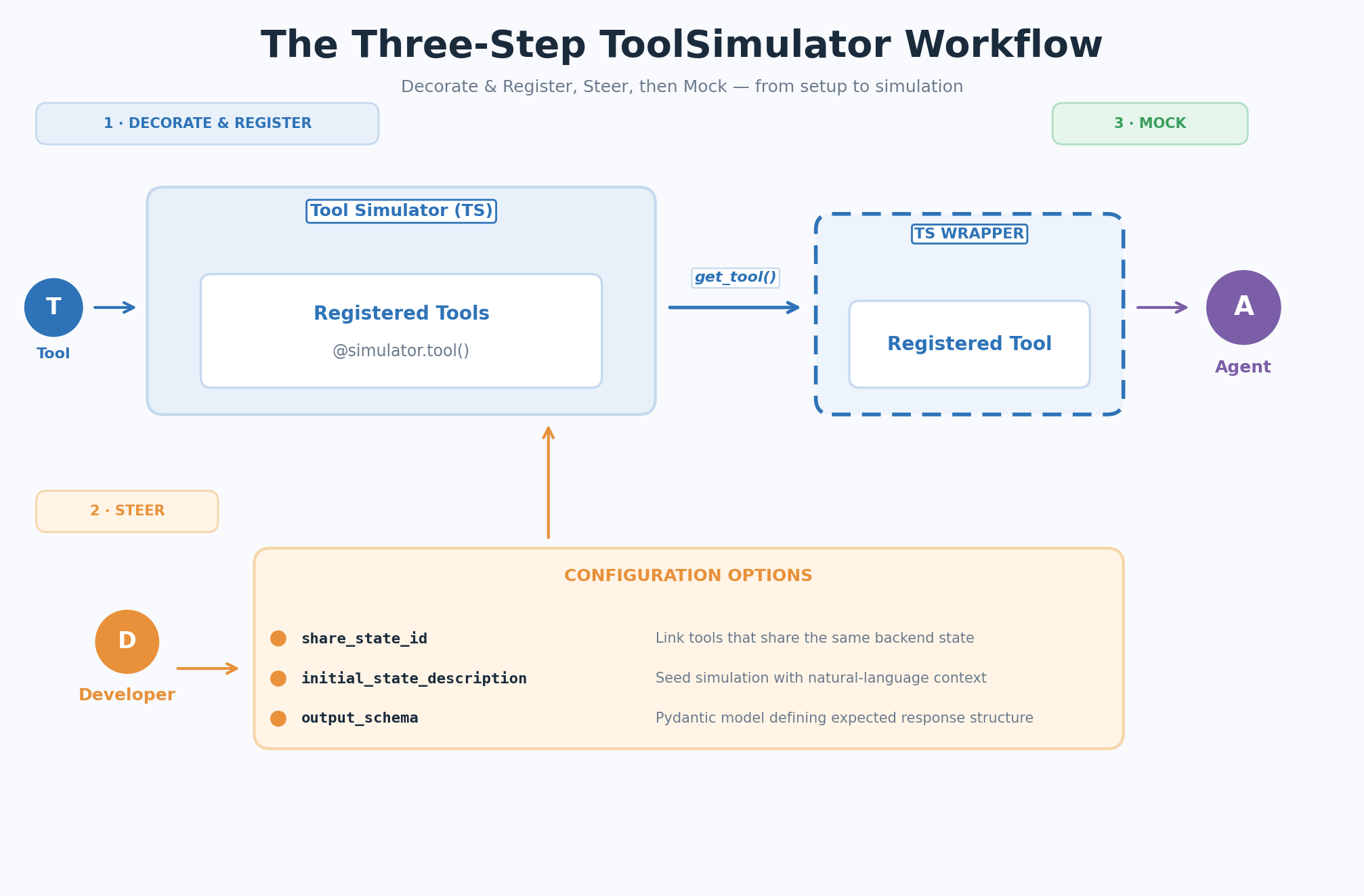 图 2:ToolSimulator(TS)的三步工作流——装饰与注册、引导、模拟
ToolSimulator 入门
以下各节将引导您完成 ToolSimulator 工作流的每个步骤,从初始设置到运行第一次模拟。
第一步:装饰并注册
创建一个 ToolSimulator 实例,然后用 @simulator.tool() 装饰器包裹您的工具函数以进行注册。真实的函数体可以保持为空。ToolSimulator 会在调用到达实现之前就进行拦截:
from strands_evals.simulation.tool_simulator import ToolSimulator

tool_simulator = ToolSimulator()

@tool_simulator.tool()
def search_flights(origin: str, destination: str, date: str) -> dict:
 """Search for available flights between two airports on a given date."""
 pass # The real implementation is never called during simulation
第二步:引导(可选配置)
默认情况下,ToolSimulator 会根据工具的 Schema 和文档字符串自动推断每个工具的行为方式。无需任何额外配置即可开始使用。当您需要更多控制时,可以使用以下三个可选参数来自定义模拟行为:
share_state_id:将共享同一后端的工具关联到一个公共状态键下。一个工具(例如设置器)所做的状态变更会立即对另一个工具(例如获取器)的后续调用可见。initial_state_description:使用自然语言描述为模拟预置已存在的状态。上下文越丰富,模拟的响应就越真实、越一致。output_schema:定义预期响应结构的 Pydantic 模型。ToolSimulator 会生成严格符合此 Schema 的响应。
第三步:模拟
当您的 Agent 调用已注册的工具时,ToolSimulator 包装器会拦截调用并将其路由到动态响应生成器。生成器根据工具 Schema 验证 Agent 的参数,生成符合 output_schema 的响应,并更新状态注册表,以便后续工具调用能看到一致的环境。
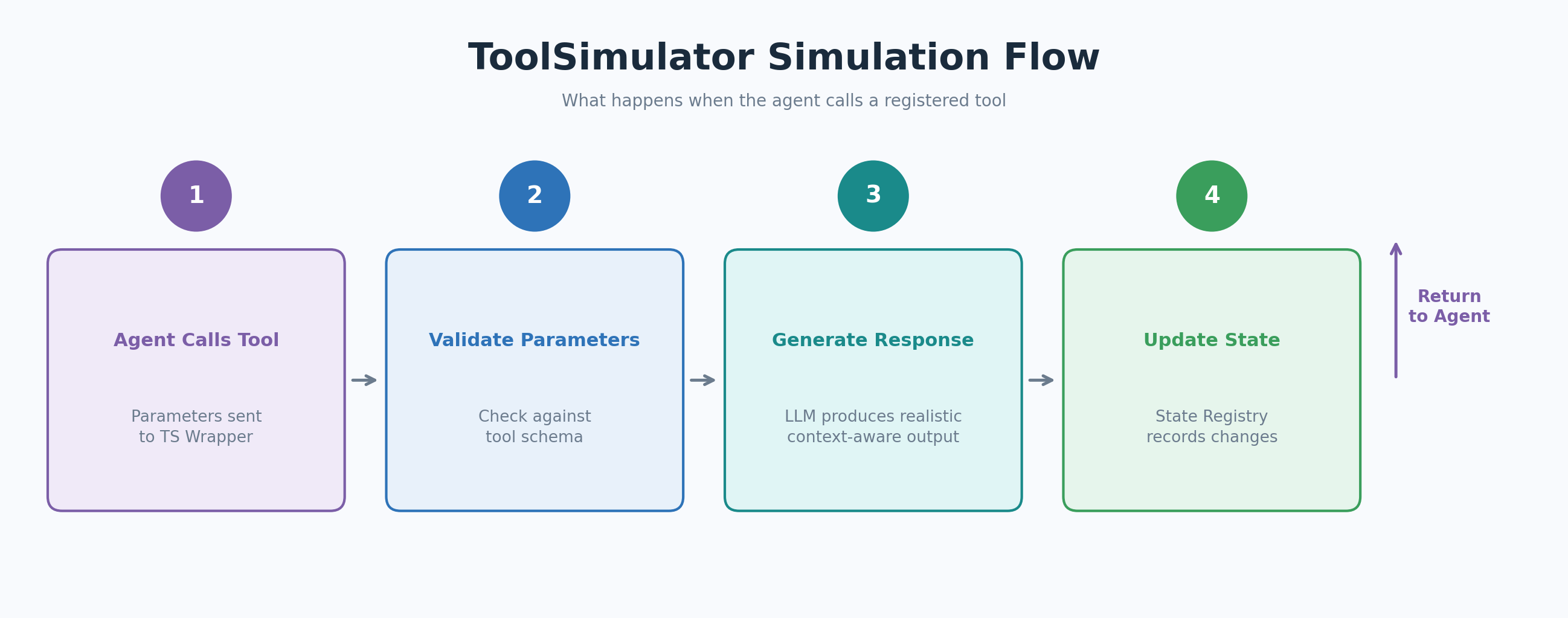 图 3:Agent 调用已注册工具时 ToolSimulator(TS)的模拟流程
以下示例展示了附加到机票搜索助手的航班搜索工具模拟:
from strands import Agent
from strands_evals.simulation.tool_simulator import ToolSimulator

# 1. Create a simulator instance
tool_simulator = ToolSimulator()

# 2. Register a tool for simulation with initial state context
@tool_simulator.tool(
 initial_state_description="Flight database: SEA->JFK flights available at 8am, 12pm, and 6pm. Prices range from $180 to $420.",
)
def search_flights(origin: str, destination: str, date: str) -> dict:
 """Search for available flights between two airports on a given date."""
 pass

# 3. Create an agent with the simulated tool and run it
flight_tool = tool_simulator.get_tool("search_flights")
agent = Agent(
 system_prompt="You are a flight search assistant.",
 tools=[flight_tool],
)

response = agent("Find me flights from Seattle to New York on March 15.")
print(response)
# Expected output: A structured list of simulated SEA->JFK flights with times
# and prices consistent with the initial_state_description you provided.
ToolSimulator 高级用法
以下各节涵盖三项高级功能,让您对模拟行为有更多控制:运行独立实例进行并行测试、配置多轮工作流的共享状态,以及强制执行自定义响应 Schema。
运行独立的模拟器实例
您可以并行创建多个 ToolSimulator 实例。每个实例维护自己的工具注册表和状态,因此您可以在同一代码库中运行并行的实验配置:
simulator_a = ToolSimulator()
simulator_b = ToolSimulator()
# Each instance has an independent tool registry and state --
# ideal for comparing agent behavior across different tool setups.
为多轮工作流配置共享状态
对于数据库读取器和设置器等有状态工具,ToolSimulator 在工具调用之间维护一致的共享状态。使用 share_state_id 将操作同一后端的工具关联起来,并使用 initial_state_description 为模拟预置已存在的上下文:
@tool_simulator.tool(
 share_state_id="flight_booking",
 initial_state_description="Flight booking system: SEA->JFK flights available at 8am, 12pm, and 6pm. No bookings currently active.",
)
def search_flights(origin: str, destination: str, date: str) -> dict:
 """Search for available flights between two airports on a given date."""
 pass

@tool_simulator.tool(
share_state_id="flight_booking",
)
def get_booking_status(booking_id: str) -> dict:
 """Retrieve the current status of a flight booking by booking ID."""
 pass

# Both tools share "flight_booking" state.
# When search_flights is called, get_booking_status sees the same
# flight availability data in subsequent calls.
在 Agent 执行前后检查状态,以验证工具交互是否产生了预期的变更:
initial_state = tool_simulator.get_state("flight_booking")
# ... run the agent ...
final_state = tool_simulator.get_state("flight_booking")
# Verify not just the final output, but the full sequence of tool interactions.
提示:从真实数据中预置状态
由于 initial_state_description 接受自然语言,您可以在预置上下文时发挥创意。对于与表格数据交互的工具,可以使用 DataFrame.describe() 调用生成统计摘要,并将这些统计数据直接作为状态描述传入。ToolSimulator 将生成反映真实数据分布的响应,而无需访问实际数据。
强制执行自定义响应 Schema
默认情况下,ToolSimulator 会根据工具的文档字符串和类型提示推断响应结构。对于遵循 OpenAPI 或 MCP Schema 等严格规范的工具,将预期响应定义为 Pydantic 模型并通过 output_schema 传入:
from pydantic import BaseModel, Field

class FlightSearchResponse(BaseModel):
 flights: list[dict] = Field( ..., description="List of available flights with flight number, departure time, and price" )
 origin: str = Field(..., description="Origin airport code")
 destination: str = Field(..., description="Destination airport code")
 status: str = Field(default="success", description="Search operation status")
 message: str = Field(default="", description="Additional status message")

@tool_simulator.tool(output_schema=FlightSearchResponse)
def search_flights(origin: str, destination: str, date: str) -> dict:
 """Search for available flights between two airports on a given date."""
 pass

# ToolSimulator validates parameters strictly and returns only valid JSON
# responses that conform to the FlightSearchResponse schema.
与 Strands 评估流水线的集成
ToolSimulator 能够自然地融入 Strands Evals 评估框架。以下示例展示了从模拟设置到实验报告的完整流水线,使用 GoalSuccessRateEvaluator 对 Agent 在工具调用任务上的性能进行评分:
from typing import Any
from pydantic import BaseModel, Field
from strands import Agent
from strands_evals import Case, Experiment
from strands_evals.evaluators import GoalSuccessRateEvaluator
from strands_evals.simulation.tool_simulator import ToolSimulator
from strands_evals.mappers import StrandsInMemorySessionMapper
from strands_evals.telemetry import StrandsEvalsTelemetry

# Set up telemetry and tool simulator
telemetry = StrandsEvalsTelemetry().setup_in_memory_exporter()
memory_exporter = telemetry.in_memory_exporter
tool_simulator = ToolSimulator()

# Define the response schema
class FlightSearchResponse(BaseModel):
 flights: list[dict] = Field( ..., description="Available flights with number, departure time, and price" )
 origin: str = Field(..., description="Origin airport code")
 destination: str = Field(..., description="Destination airport code")
 status: str = Field(default="success", description="Search operation status")
 message: str = Field(default="", description="Additional status message")

# Register tools for simulation
@tool_simulator.tool(
 share_state_id="flight_booking",
 initial_state_description="Flight booking system: SEA->JFK flights at 8am, 12pm, and 6pm. No bookings currently active.",
 output_schema=FlightSearchResponse,
)
def search_flights(origin: str, destination: str, date: str) -> dict[str, Any]:
 """Search for available flights between two airports on a given date."""
 pass

@tool_simulator.tool(share_state_id="flight_booking")
def get_booking_status(booking_id: str) -> dict[str, Any]:
 """Retrieve the current status of a flight booking by booking ID."""
 pass

# Define the evaluation task
def user_task_function(case: Case) -> dict:
 initial_state = tool_simulator.get_state("flight_booking")
 print(f"[State before]: {initial_state.get('initial_state')}")

 search_tool = tool_simulator.get_tool("search_flights")
 status_tool = tool_simulator.get_tool("get_booking_status")
 agent = Agent(
 trace_attributes={ "gen_ai.conversation.id": case.session_id, "session.id": case.session_id },
 system_prompt="You are a flight booking assistant.",
 tools=[search_tool, status_tool],
 callback_handler=None,
 )

 agent_response = agent(case.input)
 print(f"[User]: {case.input}")
 print(f"[Agent]: {agent_response}")

 final_state = tool_simulator.get_state("flight_booking")
 print(f"[State after]: {final_state.get('previous_calls', [])}")

 finished_spans = memory_exporter.get_finished_spans()
 mapper = StrandsInMemorySessionMapper()
 session = mapper.map_to_session(finished_spans, session_id=case.session_id)
 return {"output": str(agent_response), "trajectory": session}

# Define test cases, run the experiment, and display the report
test_cases = [
 Case( name="flight_search", input="Find me flights from Seattle to New York on March 15.", metadata={"category": "flight_booking"}, ),
]
experiment = Experiment[str, str](
 cases=test_cases,
 evaluators=[GoalSuccessRateEvaluator()]
)

reports = experiment.run_evaluations(user_task_function)
reports[0].run_display()
任务函数检索模拟工具,创建 Agent,运行交互,并返回 Agent 的输出和完整的遥测轨迹。该轨迹让 GoalSuccessRateEvaluator 等评估器能够访问工具调用和模型调用的完整序列,而不仅仅是最终响应。
基于模拟的评估最佳实践
以下实践有助于您在开发和评估工作流中充分发挥 ToolSimulator 的价值:
- 从默认配置开始以获得广泛覆盖。 仅为您需要精确控制的特定工具环境添加配置覆盖。ToolSimulator 的默认设置旨在无需配置即可产生真实的行为。
- 为有状态工具提供丰富的
initial_state_description值。 您预置的上下文越多,模拟的响应就越真实、越一致。请包含数据范围、实体数量和关系上下文。 - 为操作同一后端的工具使用
share_state_id, 以便写操作对后续读操作可见。这对于测试预订、购物车管理或数据库更新等多轮工作流至关重要。 - 对遵循严格规范的工具应用
output_schema, 例如 OpenAPI 或 MCP Schema。Schema 强制执行会在格式错误的响应到达 Agent 并破坏后处理层之前将其捕获。 - 验证工具交互序列,而不仅仅是最终输出。 在 Agent 执行前后检查状态变更,以确认工具调用以正确的顺序发生并产生了正确的状态转换。
- 从小处着手,逐步扩展。 从最常见的工具交互场景开始,随着评估实践的成熟逐步扩展到边缘用例。将基于模拟的测试与针对关键生产路径的有针对性的实时 API 测试相结合。
结论
ToolSimulator 通过将危险的实时 API 调用替换为智能、自适应的模拟,彻底改变了您测试 AI Agent 的方式。您现在可以安全地在大规模情境下验证复杂的有状态工作流,尽早发现集成缺陷,并自信地交付生产就绪的 Agent。将 ToolSimulator 与 Strands Evals 评估流水线相结合,可为您提供对 Agent 行为的完整可见性,无需管理测试基础设施或承担现实世界的副作用风险。
后续步骤
立即开始安全测试您的 AI Agent。使用以下命令安装 ToolSimulator:
pip install strands-evals要继续探索 ToolSimulator 和 Strands Evals,请执行以下步骤:
- 阅读 Strands Evals 文档,探索所有配置选项,包括高级状态管理和自定义评估器。
- 尝试示例,了解 ToolSimulator 的实际运行效果。通过添加更多工具并测试多步骤 Agent 工作流来扩展示例。
- 探索 Amazon Bedrock,了解为 ToolSimulator 响应生成提供支持的 LLM 后端选项。
- 了解 AWS Lambda,掌握与基于 ToolSimulator 测试相配合的无服务器 Agent 部署策略。
- 加入 Strands 社区论坛,提问、分享您的评估设置,并与其他 Agent 开发者建立联系。
分享您的反馈。 我们很乐意听取您使用 ToolSimulator 的方式。请通过 Strands Evals GitHub 仓库或社区论坛分享您的反馈、报告问题并提出功能建议。