原文标题:Developer’s Guide to AI Agent Protocols
原文链接:https://developers.googleblog.com/developers-guide-to-ai-agent-protocols/
AI Agent 协议开发者指南
作者:Shubham Saboo(高级 AI 产品经理)、Kristopher Overholt(开发者关系工程师)
简介
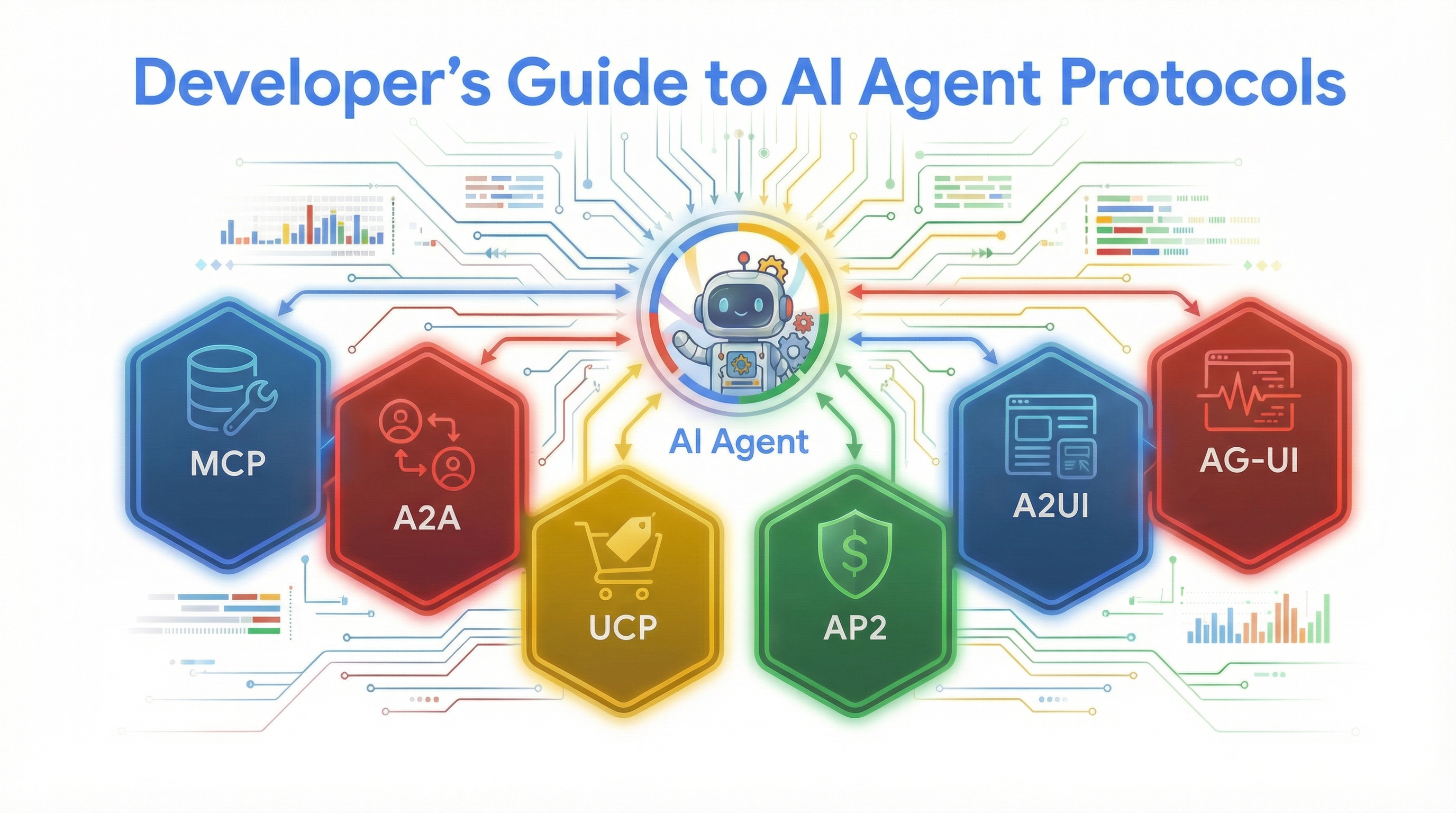
构建 AI Agent 往往意味着为每个 API 端点编写自定义集成代码、在多个框架之间协调、处理支付授权以及搭建前端界面。本文介绍六种标准化协议,旨在减少自定义集成代码,使 Agent 能够访问数据、与其他 Agent 通信、执行商业交易、进行安全的支付授权,并提供交互式用户界面。
这六种协议分别是:
- Model Context Protocol (MCP)
- Agent2Agent Protocol (A2A)
- Universal Commerce Protocol (UCP)
- Agent Payments Protocol (AP2)
- Agent-to-User Interface Protocol (A2UI)
- Agent-User Interaction Protocol (AG-UI)
我们将以一个”厨房管理 Agent”为实际示例,展示这些协议如何协同处理复杂任务——包括实时库存检查、批发商务和安全支付授权。
1. Model Context Protocol (MCP)

Model Context Protocol (MCP) 通过提供单一标准连接模式来消除为每个 API 端点编写自定义集成代码的繁琐工作。MCP 服务器会自行声明其工具定义,Agent 可以自动发现这些工具,而非为每个端点手写集成逻辑。
核心特性:
- 服务器维护自己的工具定义
- Agent 无需更新代码即可访问最新定义
- ADK 通过 McpToolset 提供一等支持
代码示例 — MCP 集成:
from google.adk.agents import Agent
from google.adk.tools.mcp_tool import McpToolset
from google.adk.tools.mcp_tool.mcp_session_manager import StdioConnectionParams
from google.adk.tools.toolbox_toolset import ToolboxToolset
from mcp import StdioServerParameters

# 1. 库存数据库 - MCP Toolbox for Databases (PostgreSQL, SQLite, BigQuery 等)
inventory_tools = ToolboxToolset(server_url=TOOLBOX_URL)

# 2. 厨房 SOP 和菜谱 - Notion MCP(读取菜单、食材清单、供应商联系方式)
notion_tools = McpToolset(connection_params=StdioConnectionParams(
    server_params=StdioServerParameters(
        command="npx", args=["-y", "@notionhq/notion-mcp-server"],
        env={"NOTION_TOKEN": NOTION_TOKEN}),
    timeout=30))

# 3. 通过邮件联系供应商 - Mailgun MCP(发送确认、追踪配送)
mailgun_tools = McpToolset(connection_params=StdioConnectionParams(
    server_params=StdioServerParameters(
        command="npx", args=["-y", "@mailgun/mcp-server"],
        env={"MAILGUN_API_KEY": MAILGUN_API_KEY}),
    timeout=30))

kitchen_agent = Agent(
    model="gemini-3-flash-preview",
    name="kitchen_manager",
    instruction="你管理一个餐厅厨房。检查库存、查找菜谱、联系供应商。",
    tools=[inventory_tools, notion_tools, mailgun_tools],
)
2. Agent2Agent Protocol (A2A)
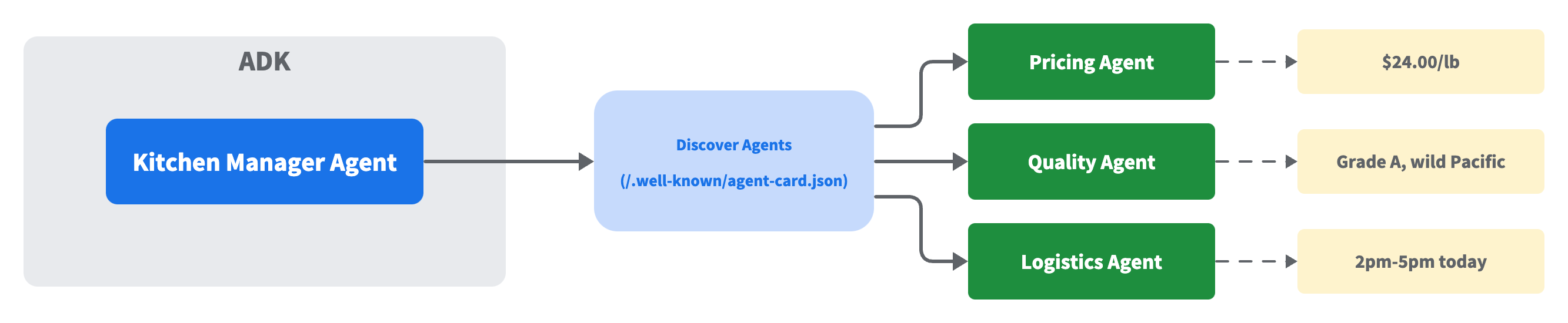
该协议标准化了不同框架和服务器上的 Agent 之间如何发现和通信。每个 A2A Agent 在一个约定的 URL(/.well-known/agent-card.json)发布一个 Agent Card,描述其名称、能力和端点。
核心特性:
- Agent 暴露标准化的 Agent Card
- 运行时发现,无需修改代码
- 支持跨多个远程 Agent 的查询
- 兼容多种 Agent 框架
代码示例 — A2A 实现:
# A2A Agent 在 /.well-known/agent-card.json 提供 Agent Card:
# {
#   "name": "pricing_agent",
#   "description": "查询当日食品批发市场价格。",
#   "skills": [{"id": "pricing", "name": "Price Check",
#               "description": "查询当前批发市场价格"}],
#   "url": "http://pricing-agent:8001/",
#   "version": "1.0.0"
# }

# 暴露:将任何 ADK Agent 转换为 A2A 服务
from google.adk.a2a.utils.agent_to_a2a import to_a2a
app = to_a2a(pricing_agent, port=8001)

# 发现:解析 Agent Card 并创建客户端 — 只需一个 URL
from a2a.client.client_factory import ClientFactory
client = await ClientFactory.connect("http://pricing-agent:8001")
card = await client.get_card()
print(f"{card.name} - {card.description}")
# -> "pricing_agent - 查询当日食品批发市场价格。"

# 调用:通过 A2A 协议发送消息
from a2a.client.helpers import create_text_message_object
msg = create_text_message_object(content="今天三文鱼的批发价是多少?")
async for response in client.send_message(msg):
    ...  # response 是一个 Task(包含 artifacts)或直接的 Message
3. Universal Commerce Protocol (UCP)
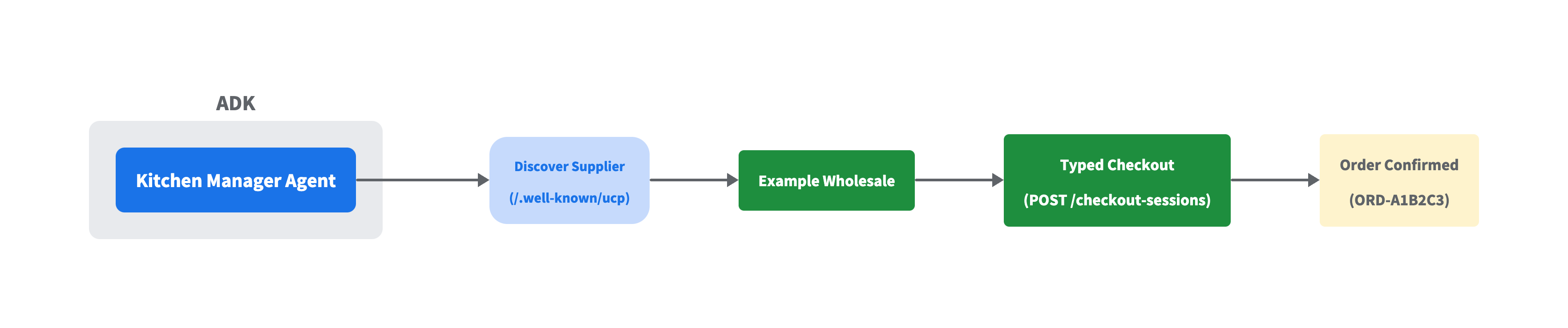
UCP 通过强类型的请求和响应 Schema 将购物生命周期标准化为模块化能力,这些 Schema 在任何底层传输协议上保持一致。这意味着无需为不同供应商分别集成 API。
核心特性:
- 跨多个供应商的统一模式
- 传输无关(REST、MCP、A2A、嵌入式协议)
- 通过 well-known URL 模式进行发现
- 使用标准 HTTP 客户端,无需专有 SDK
代码示例 — UCP 结账:
import httpx, uuid
from ucp_sdk.models.discovery.profile_schema import UcpDiscoveryProfile
from ucp_sdk.models.schemas.shopping.checkout_create_req import CheckoutCreateRequest
from ucp_sdk.models.schemas.shopping.types.line_item_create_req import LineItemCreateRequest
from ucp_sdk.models.schemas.shopping.types.item_create_req import ItemCreateRequest
from ucp_sdk.models.schemas.shopping.payment_create_req import PaymentCreateRequest

# 发现:解析供应商的 UCP 配置文件
async with httpx.AsyncClient() as c:
    profile = UcpDiscoveryProfile.model_validate(
        (await c.get("http://example-wholesale:8182/.well-known/ucp")).json())

# 下单:构建类型化的结账请求
checkout_req = CheckoutCreateRequest(
    currency="USD",
    line_items=[
        LineItemCreateRequest(quantity=10, item=ItemCreateRequest(id="salmon")),
        LineItemCreateRequest(quantity=3,  item=ItemCreateRequest(id="olive_oil")),
    ],
    payment=PaymentCreateRequest(),
)

# 发送:创建结账会话并完成(包含必需的 UCP 头部)
# UCP-Agent 头部应指向你的 Agent 能力配置文件
headers = {"UCP-Agent": 'profile="https://kitchen.example/agent"',
           "Idempotency-Key": str(uuid.uuid4()), "Request-Id": str(uuid.uuid4())}
async with httpx.AsyncClient() as c:
    checkout = (await c.post("http://example-wholesale:8182/checkout-sessions",
        json=checkout_req.model_dump(mode="json", by_alias=True, exclude_none=True),
        headers=headers)).json()
    headers["Idempotency-Key"] = str(uuid.uuid4())  # 每个操作使用新的 Idempotency-Key
    order = (await c.post(
        f"http://example-wholesale:8182/checkout-sessions/{checkout['id']}/complete",
        headers=headers)).json()
4. Agent Payments Protocol (AP2)

AP2 通过类型化的授权凭证(mandate)添加授权层,提供不可否认的意图证明,并在每笔交易上实施可配置的护栏。UCP 处理订购流程,而 AP2 管理授权并创建审计追踪。
核心组件:
- IntentMandate:定义审批参数和消费限额
- PaymentMandate:将支付绑定到特定授权
- PaymentReceipt:关闭审计追踪
- 支持在限额内自动审批或要求手动授权
代码示例 — AP2 授权流程:
from ap2.types.mandate import IntentMandate, PaymentMandate, PaymentMandateContents
from ap2.types.payment_request import PaymentCurrencyAmount, PaymentItem, PaymentResponse
from ap2.types.payment_receipt import PaymentReceipt, Success

# 餐厅老板配置护栏
intent = IntentMandate(
    natural_language_description="10 磅三文鱼,3 瓶橄榄油",
    merchants=["Example Wholesale"],    # 仅限这些供应商
    requires_refundability=True,            # 必须可退款
    user_cart_confirmation_required=False,  # 限额内自动审批
    intent_expiry="2026-02-23T20:00:00Z",   # 1 小时后过期
)

# Agent 创建 PaymentMandate,将支付绑定到意图
mandate = PaymentMandate(payment_mandate_contents=PaymentMandateContents(
    payment_mandate_id="abc123",
    payment_details_id="order-001",
    payment_details_total=PaymentItem(
        label="10 磅三文鱼 + 3 瓶橄榄油",
        amount=PaymentCurrencyAmount(currency="USD", value=294.00)),
    payment_response=PaymentResponse(request_id="order-001", method_name="CARD"),
    merchant_agent="Example Wholesale",
))

# 经理签名(模拟 — 真实 AP2 使用 JWT/生物识别在安全设备上完成)
mandate.user_authorization = "signed_hash_abc123"

# PaymentReceipt 关闭审计追踪
receipt = PaymentReceipt(
    payment_mandate_id="abc123", payment_id="PAY-001",
    amount=PaymentCurrencyAmount(currency="USD", value=294.00),
    payment_status=Success(merchant_confirmation_id="ORD-A1B2C3"),
)
# IntentMandate -> PaymentMandate(已签名)-> PaymentReceipt
# 完整审计追踪:意图、授权和支付记录
5. Agent-to-User Interface Protocol (A2UI)

A2UI 使 Agent 能够使用声明式 JSON 从固定的组件目录中动态组合全新布局。该协议仅包含 18 个安全的组件原语,如行、列和文本字段。
核心特性:
- 将 UI 结构与数据分离
- 使用 ID 引用的扁平组件列表(非嵌套)
- 提供 Lit、Flutter、Angular 渲染器
- 支持动态更新而无需重新发送组件
代码示例 — A2UI 组件组合:
# 这是 Agent 发送的内容。渲染器(Lit、Flutter、Angular)将其转换为原生 UI。

a2ui_messages = [
    # 1. 创建渲染表面
    {"beginRendering": {"surfaceId": "default", "root": "card"}},

    # 2. 发送组件树(扁平列表,ID 引用 — 非嵌套)
    {"surfaceUpdate": {"surfaceId": "default", "components": [
        {"id": "card", "component": {"Card": {"child": "col"}}},
        {"id": "col", "component": {"Column": {"children": {"explicitList": ["title", "price", "buy"]}}}},
        {"id": "title", "component": {"Text": {"usageHint": "h3", "text": {"path": "name"}}}},
        {"id": "price", "component": {"Text": {"text": {"path": "price"}}}},
        {"id": "buy", "component": {"Button": {"child": "btn-label", "action": {"name": "purchase",
            "context": [{"key": "item", "value": {"path": "name"}}]}}}},
        {"id": "btn-label", "component": {"Text": {"text": {"literalString": "立即购买"}}}},
    ]}},

    # 3. 发送数据(与结构分离 — 更新数据无需重新发送组件)
    {"dataModelUpdate": {"surfaceId": "default", "contents": [
        {"key": "name",  "valueString": "新鲜大西洋三文鱼"},
        {"key": "price", "valueString": "$24.00/磅"},
    ]}},
]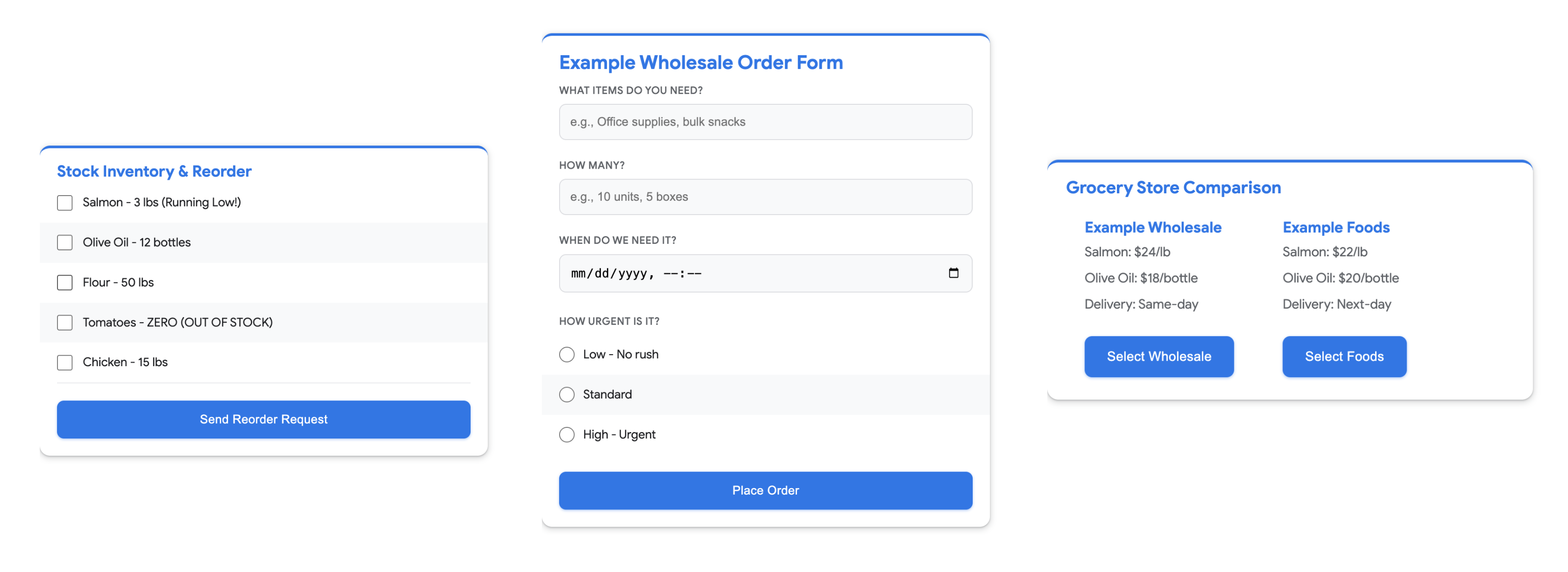
ADK 的 Web 界面(adk web)可以原生渲染 A2UI 组件,因此你可以在不构建自定义渲染器的情况下测试 Agent 的 UI 输出。
6. Agent-User Interaction Protocol (AG-UI)

AG-UI 充当中间件,将原始框架事件转换为标准化的 SSE 流。它通过提供类型化事件(无论底层 Agent 框架如何)来消除前端的样板代码。
核心优势:
- 框架无关的事件转换
- 类型化事件(TEXT_MESSAGE_CONTENT、TOOL_CALL_START 等)
- Server-Sent Events (SSE) 流式传输
- 将前端与 Agent 实现细节解耦
代码示例 — AG-UI 端点集成:
from ag_ui_adk import ADKAgent, add_adk_fastapi_endpoint
from fastapi import FastAPI

# 包装 Agent,创建应用,挂载端点
ag_ui_agent = ADKAgent(adk_agent=kitchen_mgr, app_name="kitchen", user_id="chef")
app = FastAPI()
add_adk_fastapi_endpoint(app, ag_ui_agent, path="/")
# 运行:uvicorn module:app

# SSE 流发出类型化事件:
#   RUN_STARTED
#   TOOL_CALL_START    toolCallName="check_inventory"
#   TOOL_CALL_RESULT   content="库存 3 磅,需要补货"
#   TOOL_CALL_END
#   TEXT_MESSAGE_CONTENT  delta="根据"
#   TEXT_MESSAGE_CONTENT  delta="当前库存..."
#   RUN_FINISHED
完整工作流示例
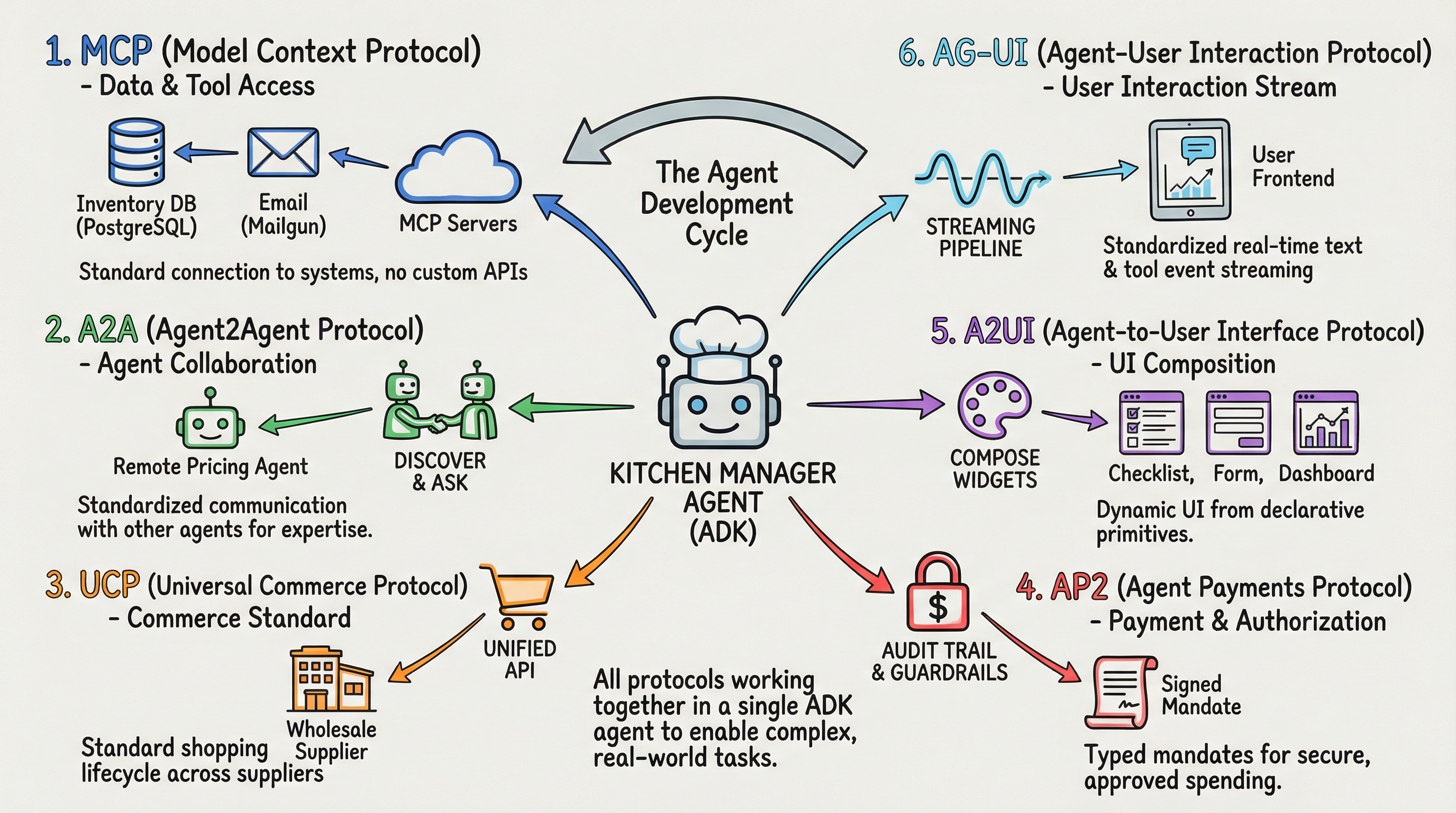
以下是一个综合示例,用户请求为:“检查我们的三文鱼库存,获取今日批发价和品质等级,如果库存不足则从 Example Wholesale 订购 10 磅并授权支付。“
阶段 1:收集信息
- MCP 查询库存数据库中的三文鱼可用量
- A2A 查询远程的价格和品质 Agent
阶段 2:完成交易
- UCP 向 Example Wholesale 发送结账请求
- AP2 在配置的护栏范围内通过支付授权保障订单
阶段 3:展示结果
- A2UI 从结果中组合交互式组件
- AG-UI 将工具调用和文本响应实时传递到前端
最佳实践
了解每个协议解决什么问题:
- MCP 将 Agent 连接到工具和数据
- A2A 将 Agent 连接到其他 Agent
- UCP 标准化商务操作
- AP2 处理支付授权
- A2UI 定义渲染结构
- AG-UI 定义流式传输机制
渐进式引入协议: 你不需要在第一天就在 Agent 中使用全部六种协议。大多数 Agent 从 MCP 的数据访问开始。随着需求增长(多 Agent 通信、商务、支付、丰富的 UI、流式传输),引入解决特定问题的协议即可。
利用现有工具: 在使用协议构建之前,先检查是否有 ADK 集成、官方 SDK 和示例代码。这些协议迭代很快,官方工具链会处理你不想自己重新实现的细节。
尽早采用标准: 这些协议仍在不断成熟,但它们建立的模式(通过 well-known URL 进行发现、类型化的请求/响应 Schema、标准事件流)让你的 Agent 与不断增长的工具、服务和其他 Agent 生态系统兼容。
入门资源
- ADK 文档
- MCP 集成指南
- ADK 集成目录
- A2A 协议文档
- A2A 示例仓库
- UCP 协议
- UCP 示例
- AP2 仓库
- A2UI 示例
- A2UI Widget Builder
- AG-UI 示例
- AG-UI 文档
引用
- 原文:Developer’s Guide to AI Agent Protocols — Google Developers Blog,2026 年 3 月 18 日
- A2A 协议
- UCP 协议
- Google ADK 文档
- AG-UI 文档